Devart Excel Add-ins2.8.1140
Publisher Description
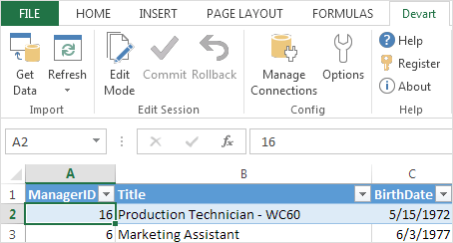
Devart Excel Add-ins allow you to use powerful Excel capabilities for processing and analysis of data from cloud applications and relational databases, edit external data as usual excel spreadsheets and save data changes back to the data source you have imported them from.
Key Features:
Powerful Data Import
With Devart Excel Add-ins you can precisely configure what data to load into the document. Select objects and columns and set complex data filters. If this is not enough, all the power of SQL is to your service, not only for relational databases, but for cloud applications too.
Quick Data Refresh
The main Devart Excel Add-ins benefit is an ability to periodically get the actual data from different data sources to Excel with a single click without repeating the whole import operation each time. Refresh data in your workbook easily whenever you want.
Easy Data Modification
You can edit data in Excel just like you usually do it, add or delete rows, modify cell values, etc. Use full power of Excel to perform mass data update, insert, and delete operations against your data source. After you finished editing, just click Commit and the changes will be posted back to the data source.
List of supported data sources:
- Oracle Database
- SQL Server
- MySQL
- PostgreSQL
- SQLite
- Salesforce
- Dynamics CRM
- Zoho CRM
- SugarCRM
- DB2
About Devart Excel Add-ins
This Databases & Tools program is available in English. It was last updated on 29 September, 2026. Devart Excel Add-ins is compatible with the following operating systems: Windows, Windows-mobile.
The company that develops Devart Excel Add-ins is Devart. The latest version released by its developer is 2.8.1140.
The download we have available for Devart Excel Add-ins has a file size of 50.3 MB. Just click the green Download button above to start the downloading process. The program is listed on our website since 2023-08-15 and was downloaded 37 times. We have already checked if the download link is safe, however for your own protection we recommend that you scan the downloaded software with your antivirus. Your antivirus may detect the Devart Excel Add-ins as malware if the download link is broken.
How to install Devart Excel Add-ins on your Windows device:
- Click on the Download button on our website. This will start the download from the website of the developer.
- Once the Devart Excel Add-ins is downloaded click on it to start the setup process (assuming you are on a desktop computer).
- When the installation is finished you should be able to see and run the program.
Program Details
System requirements
Download information
Pricing
Version History
version 2.8.1140
posted on 2023-08-15
*MariaDB 10.10 is supported
*PostgreSQL 15 is supported
*Zoho CRM API v4 is supported
*Added support for Custom App authorization (Shopify)
*Added support for Private App authorization (HubSpot)
*Salesforce Web Services API version 55.0 is supported
version 2.7
posted on 2022-09-22
*Windows 11 official support
*Compact installation function added
*Excel Add-in for Microsoft Dynamics CRM - renamed to Excel Add-in for Microsoft Dynamics 365
*In-built encryption support for SQLite databases implemented: AES-128, AES-192, AES-256, Blowfish, CAST-128, RC4, Triple DES
version 1.8
posted on 2018-09-18
*New FreshBooks API (alpha) is supported
*The API v2 for Zoho CRM is supported
*The PaymentPayouts object is added to Shopify
*The default value for the "API Version" connection parameter for MailChimp is changed from v2 to v3
version 1.7
posted on 2018-03-19
Data refresh and Edit Mode are significantly improved.
